SNMP support
The Simple Network Management Protocol (SNMP) is used to manage networks by monitoring and controlling devices connected through their IP addresses. It enables the observation of network performance, the identification of errors, and the collection of information for analysis.
A device with SNMP enabled is referred to as an agent, and it holds information about its status in the form of objects. Each object has a unique identifier known as an OID (Object Identifier), which follows a numerical hierarchy that is similar to the structure of an IP address but serving a different function. These OIDs, along with their descriptions, are stored in a MIB (Management Information Base) file, which defines the objects that can be managed through SNMP.
MIB-file
The information from OID (Object Identifier) identifiers meant to be collected from a device are hierarchically described within a MIB file. More details about how the parameter hierarchy works and how parameters relate to each other can be found in SNMP-support section from the Access Line API manual.
SNMP on iDFace
The SNMP support is controlled by the device's display and by its Web interface. In order to access such menu, navigate to [MENU] -> [SETTINGS] -> [GENERAL SETTINGS] -> [SYSTEM] -> [DIAGNOSTIC] -> [NEXT] -> [ENABLE SNMP]. From this menu, it is possible to enable and disable SNMP support.
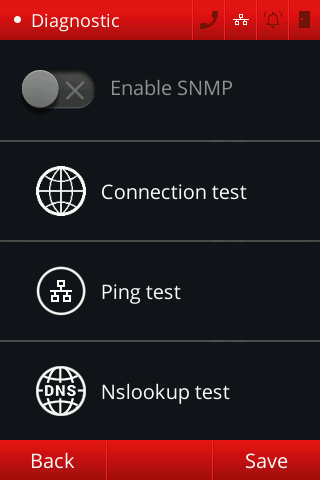
With this feature added to the device, one can access parameters that are required by the MIB file CONTROLID-MIB.txt.
Since the file is a MIB-file, it is necessary to use a tool that allows device management via SNMP, like MIB Browser.
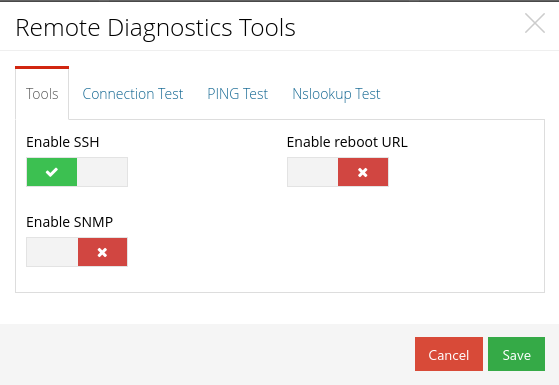
To access the configuration via Web interface, it is necessary to navigate to de device's IP, then [SETTINGS] -> [REMOTE DIAGNOSTICS TOOLS]. Through this menu, the device will enable/disable SNMP support through the button [ENABLE SNMP].